WordCraft: write online or download for desktop.

WordCraft is a free, open-source word processor from ArtCraft. Write in the editor below without an account, or download the desktop app for Windows, macOS or Linux. Find setup guides, beginner tutorials and a comparison with Microsoft Word.

Download WordCraft
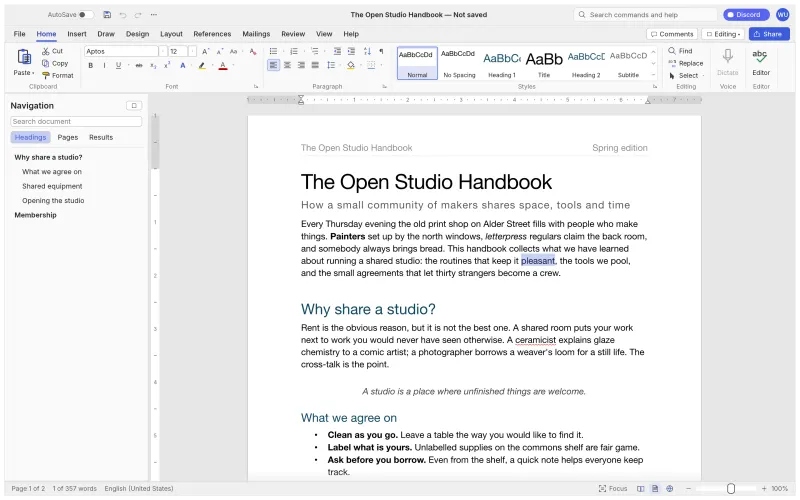
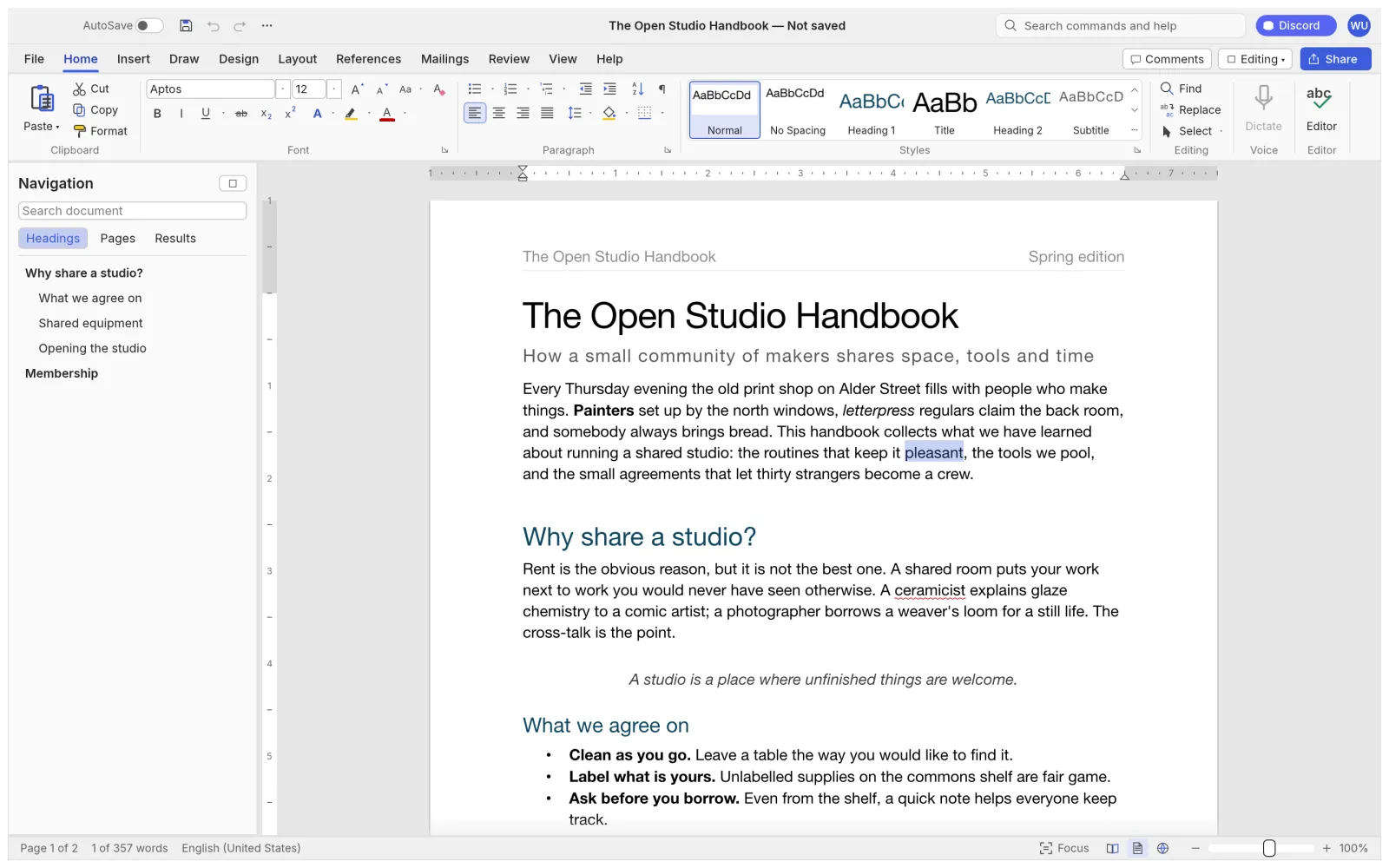
The WordCraft app with the Home tab, live Styles gallery and Navigation pane open on a two-page document

Click to load the editor on this page. Best on a desktop or laptop. Open a local file or start a blank document, then use File → Save to keep a copy on your device.

Open editor in a new tab ↗
$0
Free forever. No trial, no paid tier.
MIT / Apache-2.0
Open source you can read and audit.
422
Commands behind the ribbon, CLI and MCP.
88%
Of Word's ribbon features already covered.

What is WordCraft?

WordCraft is a free, open-source word processor for creating and editing documents. Its familiar ribbon brings text formatting, styles, tables and review tools into one workspace, with .docx support for exchanging files with Microsoft Word.

Choose WordCraft for desktop if you want to write offline using native file dialogs. Our download guide lists Windows, macOS and Linux builds, installation steps, release notes and checksums. Desktop links go to the developers' GitHub releases.

To try WordCraft before installing it, load the editor above and choose Blank document or open a local file. You can format text, add a table and save a copy to your device. The beginner tutorial explains each step; no site account is required.

WordCraft is developed by ArtCraft. This site is an independent guide and hosts the browser build. The Microsoft Word comparison covers file compatibility, offline use and collaboration, so you can assess whether the editor suits your work. Keep copies of important files while testing the alpha release.
WordCraft downloads, explained

Choose your operating system, then follow our English installation guide. Download buttons point to the WordCraft developers' release files on GitHub.

Windows

Windows 10 and 11. Signed .msi installer or portable .zip, for x64, ARM64 and 32-bit PCs.

Linux

AppImage, Flatpak, .deb, .rpm and tarballs for x86_64, ARM64 and RISC-V.

Download WordCraft.AppImage x86_64
Download guide, installation steps and checksums

How to use WordCraft online

Use the editor at the top of this page to create a document or open a copy of a local file. Try formatting a paragraph, applying a heading style and inserting a table. Save your work to your device before closing the page. Nothing needs to be installed, and no site account is required. The online guide covers browser requirements, fonts and saving files.

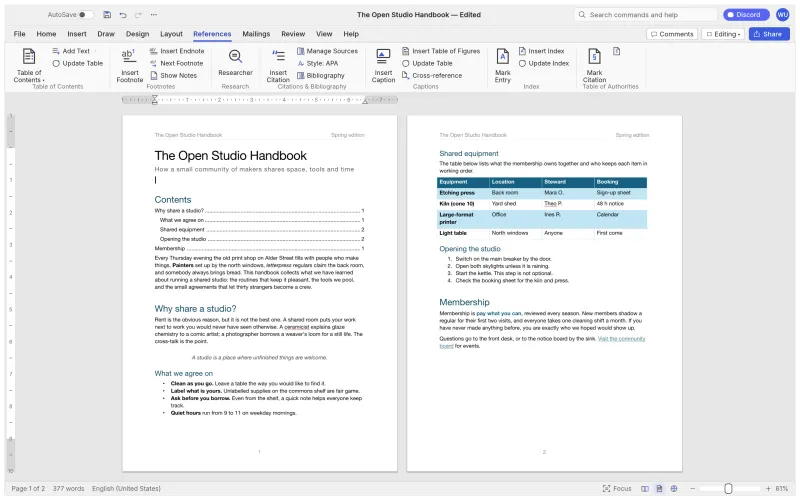
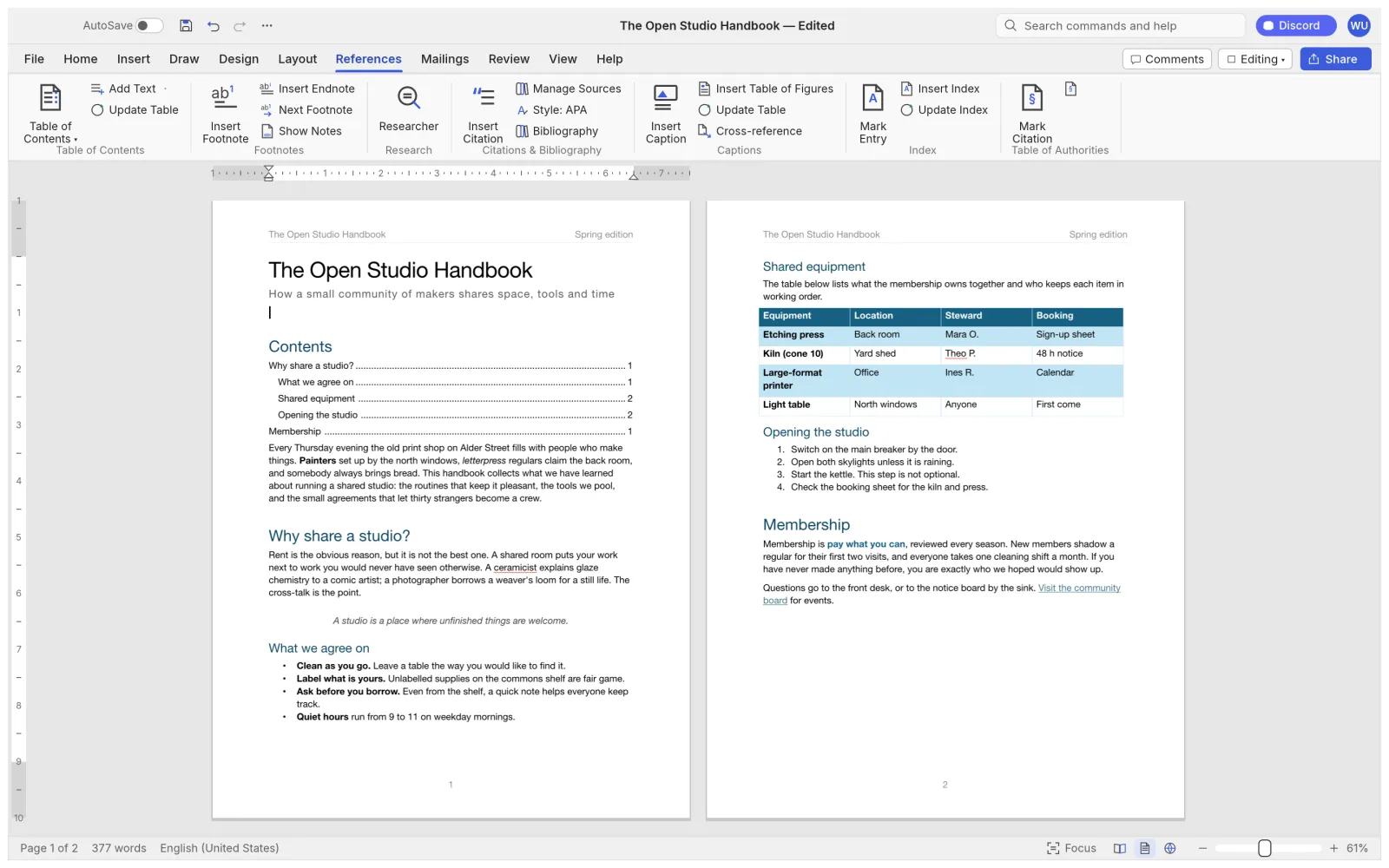
WordCraft References tab with a table of contents

Inside the WordCraft app

Official screenshots of WordCraft itself. Drag or scroll sideways to see each ribbon tab.

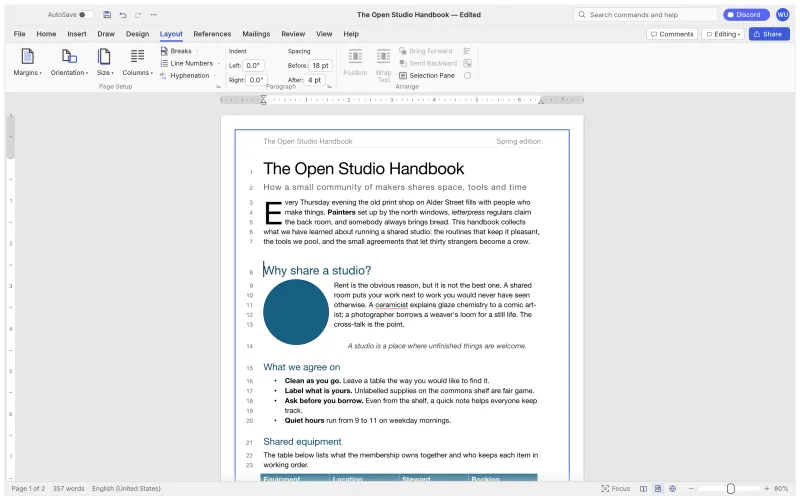
WordCraft Home & live Styles
Home & live StylesThe ribbon, rulers, Navigation pane and a Styles gallery that previews as you hover.
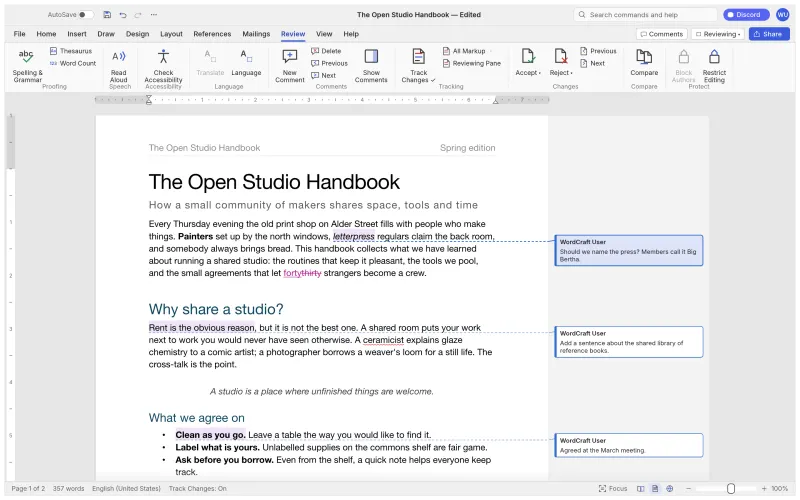
WordCraft Review
ReviewTrack changes, comment balloons, accept/reject and spelling & grammar as you type.
WordCraft References
ReferencesTables of contents, footnotes, citations in APA, MLA, Chicago or IEEE, index and captions.
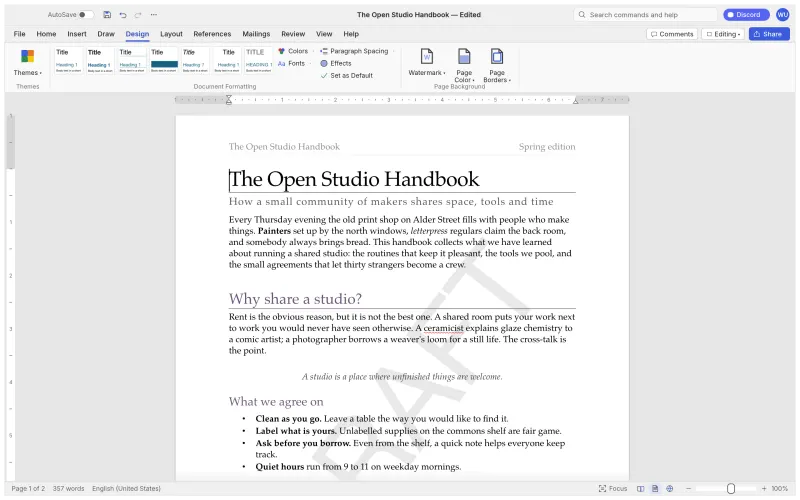
WordCraft Design
DesignThemes, style sets, paragraph spacing, watermarks, page colour and borders.
WordCraft Layout
LayoutDrop caps, text wrapping, automatic hyphenation, line numbers and page borders.
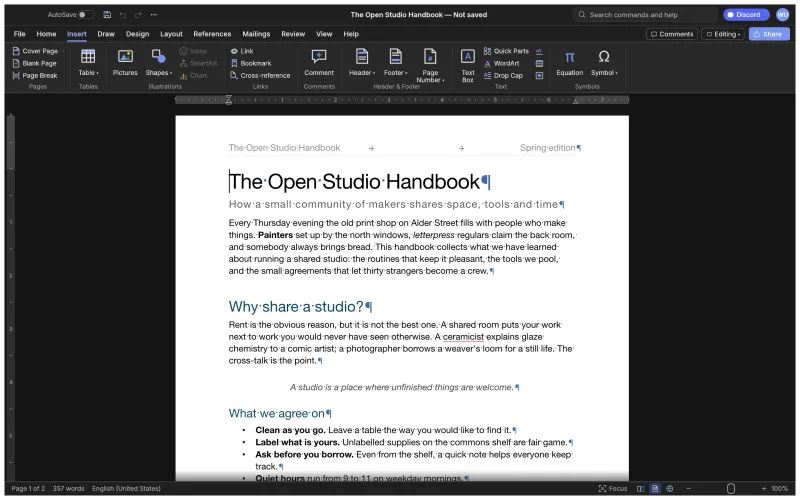
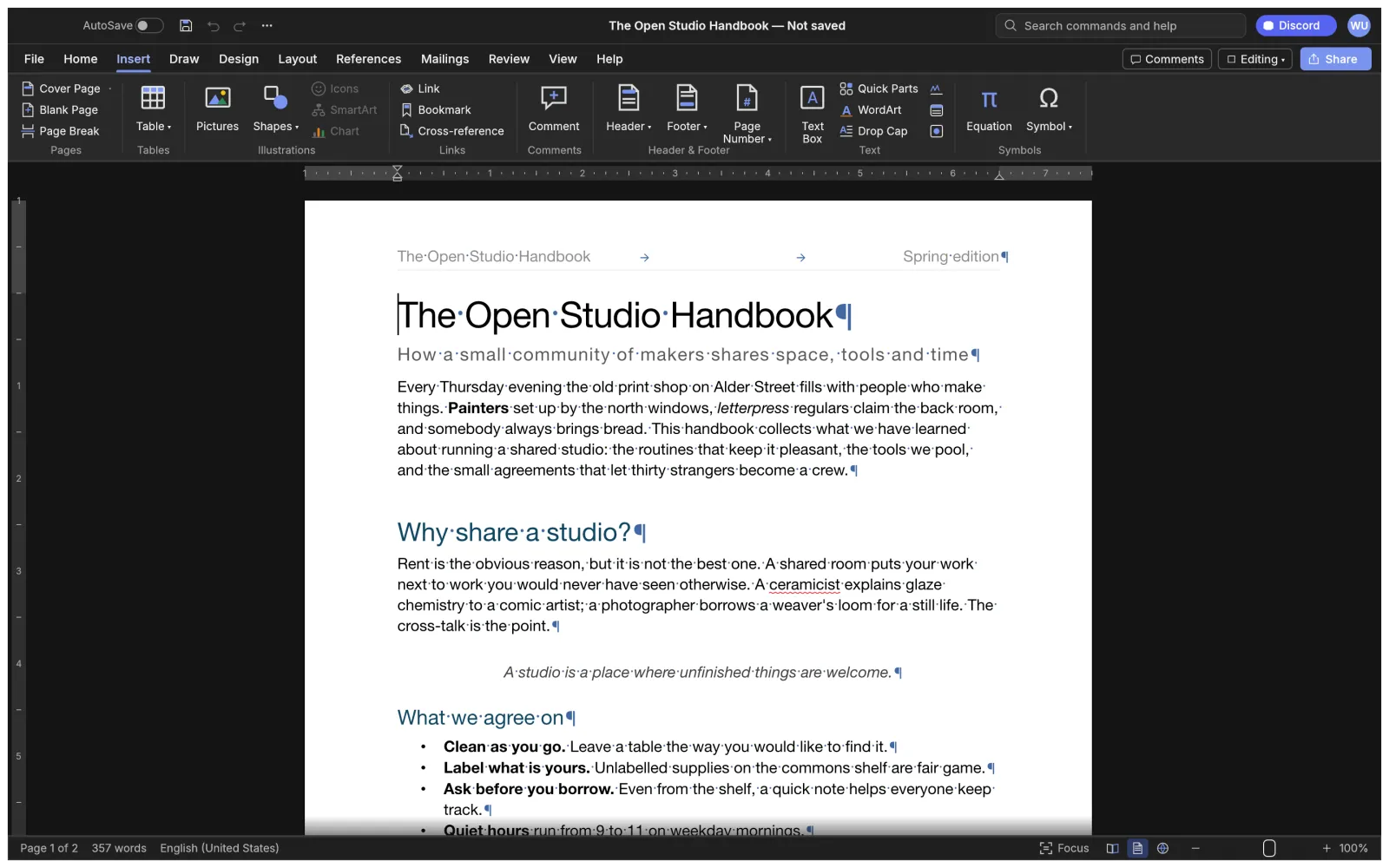
WordCraft Dark mode
Dark modeA real dark theme with formatting marks, plus the full Insert tab.

Explore what WordCraft can do

Get to know the editor before you choose it. These features are a starting point; our tutorials and Microsoft Word comparison explain how they fit everyday writing tasks.

Familiar from minute one

Word's ribbon tabs, groups and shortcuts: Enter continues a list, Tab demotes it, F4 repeats, F7 checks spelling.

Your files, your formats

Opens and saves .docx; imports .doc; reads and writes .odt, .rtf, .html, .md, .tex and .txt; exports PDF with selectable text.

Seriously fast

Layout is cached per paragraph, so typing in a 188-page document re-lays it out in about 1.4 ms.

Runs everywhere

One Rust codebase for Windows, macOS, Linux, BSD and the browser, drawn natively on the GPU.

Built for AI agents

Every action is a command. The same commands drive the ribbon, a CLI, a JSON control channel and an MCP server.

Private by design

Spelling, grammar and everything else work offline. No account, no subscription, no upload.

WordCraft vs Microsoft Word

Compare cost, supported platforms, document compatibility, offline use and collaboration. See WordCraft's advantages alongside the areas where Microsoft Word may suit your work better.

WordCraftMicrosoft Word
PriceFree foreverMicrosoft 365 subscription or one-time Office purchase; limited free web version
Source codeOpen source (MIT or Apache-2.0)Proprietary
Account requiredNoMicrosoft account to activate and to use the web app
PlatformsWindows, macOS, Linux, FreeBSD, browserWindows, macOS, iOS, Android, browser. No Linux app
Opens & saves .docxYes (alpha: test important files)Yes, it defines the format
Works offline, incl. spellingYes, everything runs locallyDesktop app yes; some features need the cloud
AI & automationAgent-ready: CLI + MCP server, 422 scriptable commandsCopilot (paid add-on in many plans), VBA macros
Real-time co-authoringNot yetYes, via OneDrive / SharePoint
MaturityAlpha. About 60% of the way to replacing Word for real work40 years of production use
Read the full comparison

Create your first WordCraft document

Read the beginner tutorials
  1. Start the editor

    Click “Try WordCraft here” at the top of this page to load the browser editor. For offline writing, choose a desktop build from the download guide.

  2. Create or open a document

    Choose Blank document from the File menu, or open a copy of an existing file. Type a paragraph, apply a heading style and try inserting a table.

  3. Save and check your work

    Use File → Save or Ctrl/Cmd + S to keep a copy on your device. Check the saved file and review the layout when exchanging documents with Microsoft Word.

WordCraftApp questions, answered

Try WordCraft directly in the editor on this homepage, download a desktop build, follow beginner tutorials, and compare it with Microsoft Word. You can use the editor and read the guides without creating a site account.

Our guides and hosted browser editor are free to use, and no WordCraftApp account is required to read, download or try online. WordCraft itself is open-source software under the MIT or Apache-2.0 license.

WordCraft is ArtCraft's free, open-source word processor. ArtCraft develops the app; this site independently hosts its browser build and provides download guides and tutorials.

WordCraft is developed by the ArtCraft team. This site is an independent guide that hosts the browser editor and provides download help, tutorials and comparisons. The developers' product page is getartcraft.com/apps/wordcraft.

Yes. It opens and saves .docx natively and imports older Word 97-2003 .doc files. Because WordCraft is still in alpha, keep a copy of important documents and check complex layouts (charts, SmartArt) after a round trip.

That depends on your documents and workflow. Our comparison covers WordCraft's advantages and limitations, including file compatibility and collaboration. Try copies of your important documents first, especially if you rely on complex formatting, macros or Microsoft 365 services.

Our desktop download links lead to the developers' GitHub releases at storytold/wordcraft. Use the download guide to choose your platform, then check the release notes and published checksums before installing.

Click “Try WordCraft here” to load the browser editor on this homepage, or open it in a separate tab. The editor runs in your browser, opens local documents and saves your work to your device. Save before closing the page; this site does not provide document cloud storage.

The desktop app runs on Windows 10 and 11, current macOS on Apple silicon or Intel, most 64-bit Linux distributions and FreeBSD 14. It draws with the GPU through DirectX 12, Metal or Vulkan and falls back to software rendering on older PCs. WordCraft online needs a recent browser with WebGPU or WebGL2.

ArtCraft builds its Crafting Apps with the help of AI coding tools, which is how a small team could reimplement a Word-class editor so quickly. The code is a clean-room implementation written in Rust from public specifications, and it is all open for anyone to read.

Email support@wordcraftapp.com for questions about our guides, broken download links, tutorials, comparisons or access to the hosted online editor. Include the page URL and relevant browser or operating-system details. Software development requests belong with the WordCraft developers.

Choose how to start.

Try WordCraft in the editor above, or download the desktop app for offline writing. Follow the beginner tutorial to create, format and save your first document.