
WordCraft Comments and Track Changes: A Team Review Workflow
Set up a clear review handoff, separate comments from edits, resolve changes and inspect the final shared copy.
A useful review process answers three questions: what changed, why it changed, and who decides whether to keep it. Comments explain an issue; tracked changes preserve proposed edits. WordCraft documents these tools in its Review feature overview. This exercise is a file-based handoff. It does not assume that opening this site's browser editor creates a shared cloud document or a simultaneous editing session.
Prepare a review copy and a small test
Create a short practice document with a deadline, a price and one paragraph describing a task. Save an untouched baseline. Make a second copy named something like proposal-review-01.docx and agree with your reviewer that this is the next file in the sequence. Choose one person to assemble the final version.
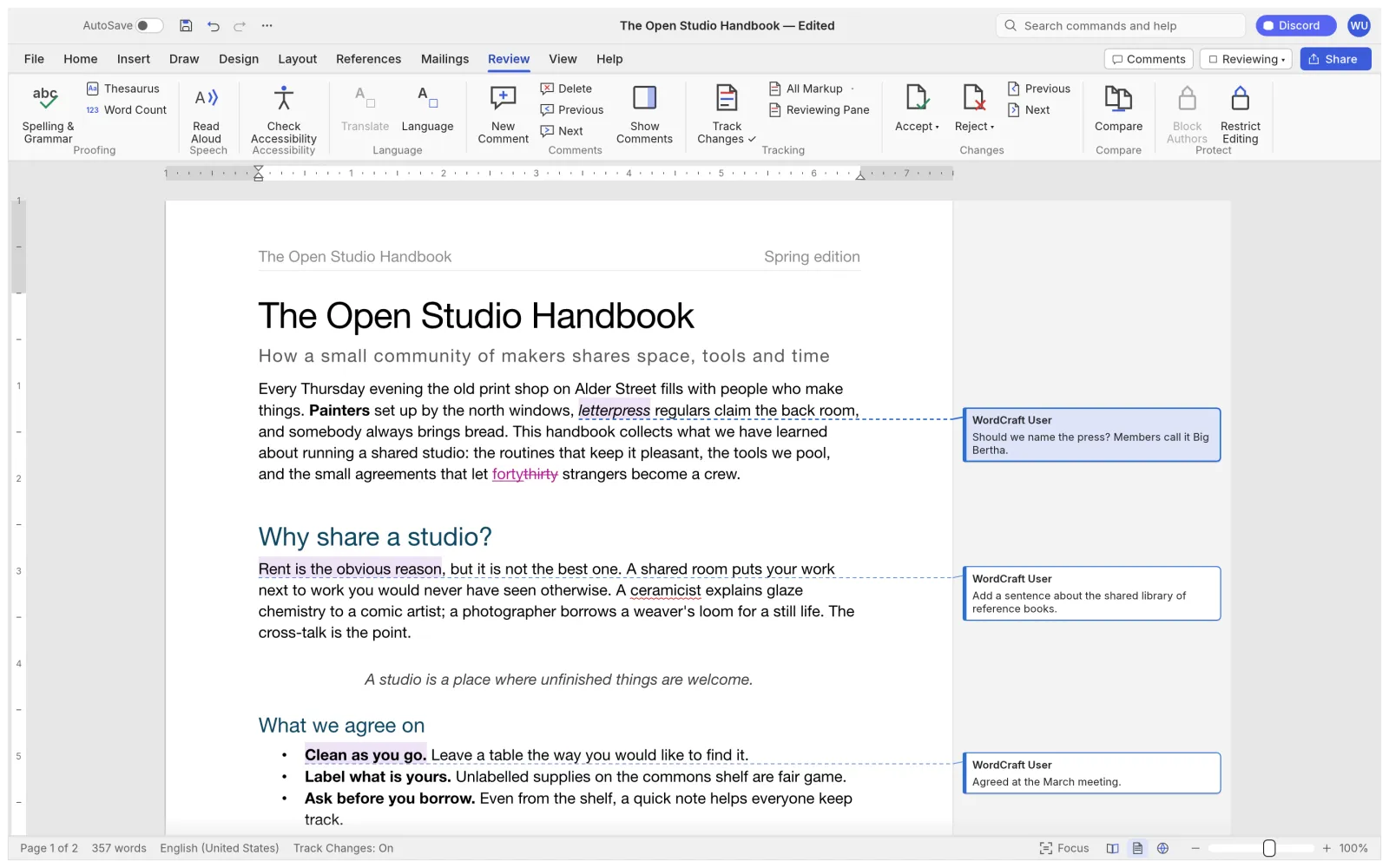
In the Review tab, enable Track Changes before editing. Replace one word, delete a sentence and add a new sentence. Check that these operations appear as review markup. If a revision-author setting is available, set it before making changes and confirm the resulting attribution. Do not infer identity from a filename alone.
Save and reopen this short review file in the actual application your colleague will use. Confirm that the inserted and deleted text remains distinguishable. This small handoff is a practical test of your workflow; it is not evidence that every review feature will survive every document conversion.
Use comments for decisions, revisions for wording
Select the exact phrase that needs discussion and add a comment from Review. Write an actionable question, such as “Should this deadline be Friday or Monday?” A comment attached to the relevant phrase is easier to act on than a general message at the end of the file.
Use tracked edits when you know the replacement wording. Use a comment when the team must make a decision first. Avoid both deleting a passage and leaving an unexplained “fix this” comment on it. Include enough context for a reviewer who did not attend the discussion.
Return the file with a clear revision number and a short description of the review scope. Sequential handoffs reduce competing copies. If two people review the same baseline separately, preserve both returned files and reconcile their changes deliberately; do not overwrite one with the other.
Resolve the review and inspect the deliverable
Work through changes individually. Read the surrounding paragraph before accepting or rejecting an edit, especially where a deletion changes a date, amount or negation. Hiding markup changes the view; it does not mean revisions have been accepted. Turning Track Changes off affects subsequent editing, not the existing revision history.
Resolve each comment after recording the decision in the document where necessary. Keep an archived review copy before removing review material from the version intended for delivery. Check the final document with markup visible, then inspect its clean reading view. Confirm that no unresolved question or accidental deletion remains.
Finally, save a new final DOCX and reopen it in the receiving application. If sending a PDF, inspect the exported pages for visible comments and revision marks rather than assuming the export excluded them. For a repeatable handoff, follow the DOCX compatibility checklist; for a first draft, use the first-document walkthrough.
Independent editorial guidance. See our sources and correction policy.